Preschool Management Software vs Excel: Which Is Better for Daily Operations?
Running a preschool involves much more than managing classrooms and planning activities. Every day, the team handles admission enquiries, child records, attendance, fee collection, parent communication and staff coordination.
Many preschool owners initially use Excel to manage these activities. It is familiar, affordable and easy to customise. However, as the number of children, parents and staff increases, managing multiple spreadsheets can become time-consuming.
This raises an important question: should you continue using Excel or switch to preschool management software?
Let’s compare both options to understand which is better for managing your preschool’s daily operations.
1. Managing Admissions and Child Records
With Excel: You can create separate spreadsheets to record admission enquiries, children’s details, parent contact information and admission status. However, staff may need to update multiple sheets whenever information changes. Tracking follow-ups can also become difficult when several people handle admissions.
With Preschool Management Software: Admission enquiries, applications and child profiles can be managed through a central system. Staff can check admission status, update records and access relevant information without searching through different files.
Which is better? Excel can work for a preschool with a small number of admissions. A dedicated system is more practical when enquiries and enrolments increase throughout the year.
2. Tracking Daily Attendance
With Excel: Teachers or administrators can maintain attendance using a daily spreadsheet. However, attendance needs to be entered and updated manually. Checking records across different classes or finding previous attendance details may require additional effort.
With Preschool Management Software: Attendance can be recorded digitally, with records organised by child, classroom and date. Depending on the system, parents can also receive attendance notifications.
Which is better? Software makes daily attendance easier to maintain, particularly when multiple classrooms and staff members are involved.
3. Managing Fee Collection and Payments
With Excel: You can maintain fee records, calculate pending amounts and track payments using formulas. However, someone must regularly update payment entries, check outstanding fees and prepare receipts. Manual updates also increase the possibility of incorrect entries or missed payment records.
With Preschool Management Software: Fee schedules, payment records, outstanding balances and reminders can be managed in one place. Some systems also support online payments and digital receipts.
Which is better? Excel may be sufficient when fee collection is simple. Software becomes more useful when the preschool manages different fee structures, instalments, late payments and multiple payment records.
4. Communicating with Parents
With Excel: Spreadsheets can store parent contact details, but they cannot manage everyday communication on their own. Staff generally need separate channels for sharing notices, reminders, photographs and updates. This can make it difficult to keep communication organised.
With Preschool Management Software: Parent communication can be connected with student records. Depending on the features available, schools can share announcements, daily activity updates, photographs and important reminders through a dedicated communication system.
Which is better? A dedicated system offers a more organised way to communicate with parents, especially when teachers and administrators need to share updates regularly.
5. Managing Staff and Daily Responsibilities
With Excel: Staff attendance, leave records, classroom allocations and daily responsibilities can be maintained in separate sheets. Keeping these records updated requires regular manual coordination.
With Preschool Management Software: Staff information, attendance, classroom responsibilities and other operational records can be managed centrally, depending on the software’s capabilities.
Which is better? For a preschool with multiple teachers, support staff or branches, centralised records can make coordination easier.
6. Reports and Daily Performance Tracking
With Excel: Excel offers formulas, filters, charts and pivot tables to prepare reports. However, the accuracy of these reports depends on updated data and correctly maintained formulas. Preparing reports from several spreadsheets can also take time.
With Preschool Management Software: Reports can be generated using information already recorded in the system. Owners can review admissions, attendance, fee collections and other operational details from a central dashboard, depending on the platform.
Which is better? Excel is useful for basic reporting, while software can reduce the effort involved in preparing regular operational reports.
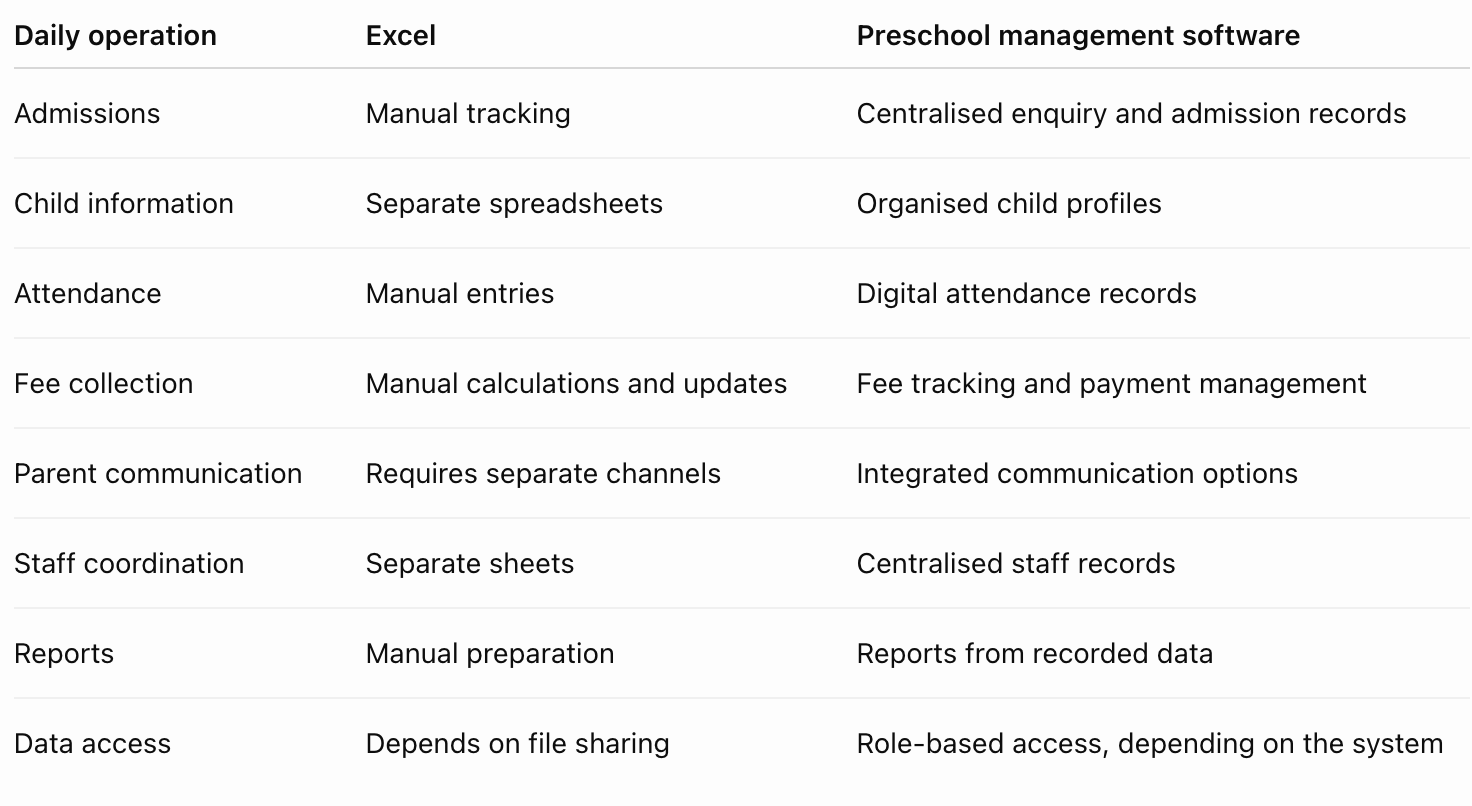
Excel vs Preschool Management Software: Quick Comparison
Compare Excel and Preschool Management Software across key features to understand which solution best supports your preschool’s daily operations.
When Should a Preschool Move from Excel to Software?
Excel is not necessarily the wrong choice for every preschool. A newly opened centre with a small number of children and simple administrative requirements may find spreadsheets sufficient.
1. However, consider moving to preschool management software when:
2. Staff spend too much time updating multiple spreadsheets.
3. Admission and fee records are becoming difficult to track.
4. Attendance information needs frequent checking.
5. Parents regularly request updates about their children.
6. Different staff members need access to the same information.
7. Preparing monthly reports takes considerable time.
8. You are planning to expand or manage multiple branches.
The decision should depend on your daily workload, not just the number of children enrolled.
Final Verdict: Which Is Better?
Excel is a useful starting point for managing basic preschool records. It is flexible and familiar, but it requires regular manual updates and coordination.
Preschool management software offers a more connected way to manage admissions, attendance, fees, parent communication and staff operations. It becomes particularly valuable when administrative work starts taking time away from teachers and school management.
If you want to simplify everyday preschool operations, School Hub can help bring essential management activities into one system. Explore School Hub to understand how it can support your preschool’s administrative needs as it grows.
Frequently Asked Questions
Q1. Is Excel enough to manage a preschool?
A: Excel can manage basic records for a small preschool. However, as admissions, attendance, fee collection and communication requirements increase, maintaining multiple spreadsheets can become difficult.
Q2. What is preschool management software?
A: It is a digital system that helps preschools manage daily activities such as admissions, child records, attendance, fee collection, parent communication and administrative reporting.
Q3. Is preschool management software better than Excel?
A: For preschools with multiple classrooms, staff members and growing administrative requirements, dedicated software can offer better organisation and reduce manual work.
Q4. Can preschool management software manage fee collection and attendance?
A: Yes. Many systems offer digital attendance tracking, fee records, payment updates and outstanding fee reports. Available features depend on the software.
Q5. Is it difficult to switch from Excel to preschool management software?
A: Not necessarily. Many systems allow schools to transfer existing student and fee records. Before switching, organise your spreadsheets, check data accuracy and train staff to use the new system.