Payment Gateway Checklist for Shopify, WooCommerce & Magento Stores
Introduction
Choosing a payment gateway for an ecommerce store is not only about accepting cards, UPI, wallets, or other payment methods. The gateway also needs to work properly with your ecommerce platform, checkout, plugins, extensions, order management, and overall customer journey.
A payment integration that looks fine during setup can still create problems later if a payment fails but the order is marked as successful, a plugin conflicts with checkout, or the gateway does not handle increased traffic during a major sale.
That is why your payment gateway checklist should be based on how your store actually works.
Whether you use Shopify, WooCommerce, or Magento, this guide covers the key checks to complete before integrating or switching to a payment gateway.
Shopify Payment Gateway Checklist
Shopify makes payment setup relatively straightforward, but that does not mean every payment gateway will provide the same experience.
Before connecting a payment provider, check the following:
1. Confirm Provider Availability
Make sure the gateway is supported for your Shopify store and target market. Check whether it is available as a third party payment provider and what information is required for activation.
2. Check Checkout Integration
Understand whether customers remain within the expected Shopify checkout experience or are redirected to an external payment page to complete the transaction.
A redirect is not automatically a problem, but you should test the complete payment journey on both mobile and desktop.
3. Check Payment and Order Synchronization
After a successful payment, the Shopify order should update correctly.
Test what happens when:
• Payment succeeds
• Payment fails
• The customer closes the payment window
• Payment takes longer than expected
• The customer attempts the payment again
4. Review Third Party Transaction Costs
If you use a third party payment provider, review any additional transaction fees applicable to your Shopify plan along with the provider’s own charges.
Shopify currently documents third party transaction fees for transactions processed through third party payment providers, with specific exceptions depending on the payment method, plan, and configuration.
5. Run Test Transactions
Do not move directly from integration to live payments.
Use the available test environment or test mode to verify the payment journey before accepting real transactions.
WooCommerce Payment Gateway Checklist
WooCommerce gives merchants more control over plugins, themes, checkout, and customizations. That flexibility also means more compatibility checks.
1. Check Plugin Compatibility
Before installing a payment gateway plugin, check:
• Supported WooCommerce version
• Supported WordPress version
• PHP requirements
• Date of the last plugin update
• Plugin support and documentation
• Compatibility with your theme
2. Check Cart and Checkout Block Compatibility
This is an important check for modern WooCommerce stores.
WooCommerce supports Cart and Checkout Blocks, and payment gateways need to be compatible with this checkout experience to work correctly. WooCommerce provides specific compatibility requirements for payment gateway extensions.
Do not assume that a gateway plugin that worked with the classic checkout will automatically work with the newer block based checkout.
3. Check for Conflicts with Other Plugins
Test the gateway alongside your:
• Checkout plugins
• Page builders
• Security plugins
• Caching plugins
• Currency plugins
• Subscription extensions
• Shipping and tax extensions
WooCommerce recommends using a staging environment when testing plugin and theme conflicts so that changes can be tested without affecting the live store.
4. Verify Order Status Updates
Check that payment results correctly update the WooCommerce order.
For example:
Successful payment → Processing or Completed order
Failed payment → Failed or Pending order
Incorrect order status updates can create unnecessary fulfillment and customer support issues.
5. Test Express Checkout
If your gateway supports options such as Apple Pay, Google Pay, or other express payment methods, verify that they work with your store’s current checkout configuration.
Payment method compatibility can vary depending on the checkout experience and gateway integration.
Magento Payment Gateway Checklist
Magento and Adobe Commerce stores generally require a more technical evaluation, particularly when the store has multiple websites, stores, currencies, or customized checkout flows.
1. Check Magento and Extension Compatibility
Confirm that the payment extension supports your current Magento or Adobe Commerce version.
Also check whether future platform upgrades could affect the integration.
2. Review API and Webhook Support
For customized Magento environments, API flexibility is important.
Check whether the gateway can reliably communicate payment events such as:
• Payment initiated
• Payment successful
• Payment failed
• Refund processed
• Payment status updated
This helps keep the payment gateway, Magento order system, and other business systems synchronized.
3. Check Multi Store Requirements
If you operate multiple stores, countries, brands, or currencies from the same Magento environment, confirm how the gateway handles each configuration.
Adobe Commerce supports a hierarchy of websites, stores, and store views, with different configurations for localization and currency.
4. Test Custom Checkout Flows
Magento stores often have customized checkout experiences.
Test the payment gateway with your actual checkout rather than relying only on the provider’s standard demo environment.
5. Check Scalability
Ask how the gateway performs when transaction volumes increase.
This becomes particularly important during:
• Flash sales
• Seasonal campaigns
• Product launches
• Large advertising campaigns
• Marketplace promotions
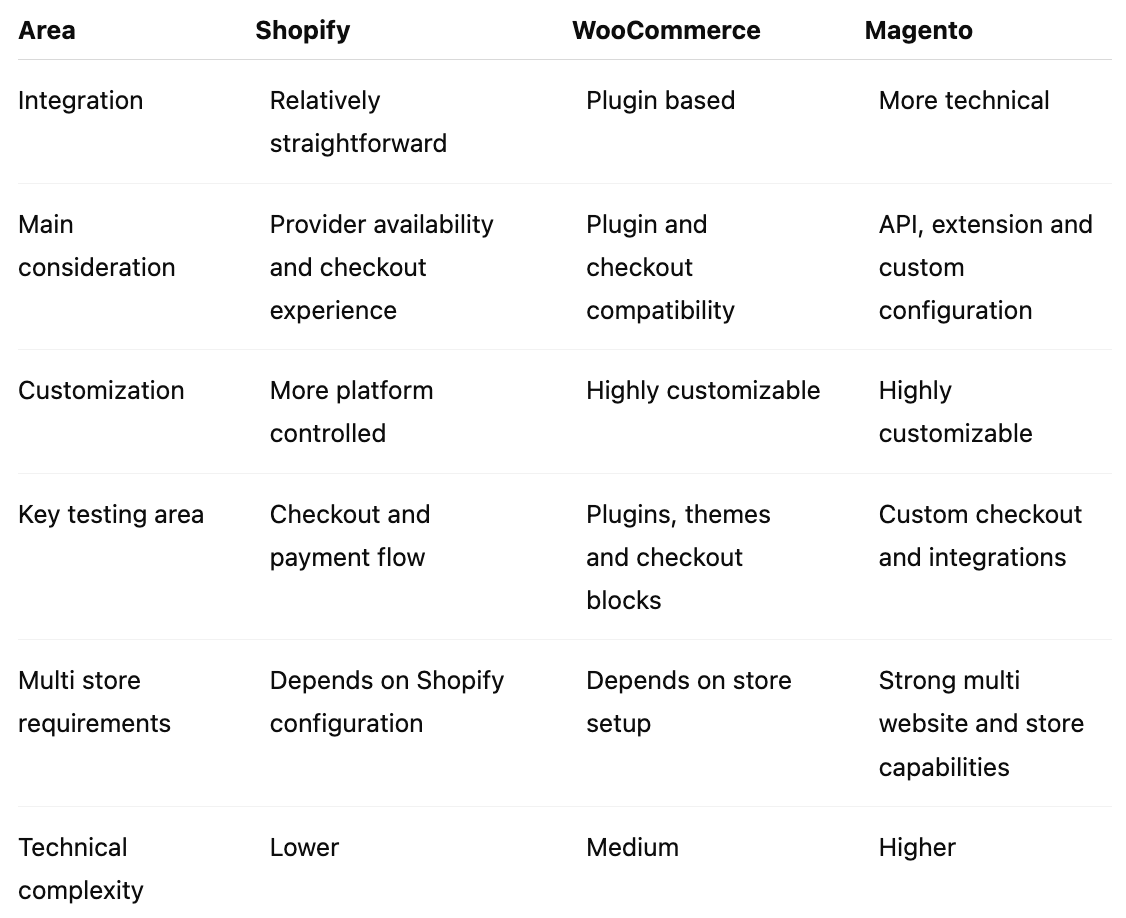
Shopify vs WooCommerce vs Magento: Quick Comparison
The right payment gateway checklist depends on how much control and customization your ecommerce store requires.
Final Payment Gateway Checklist
Before going live, make sure you have checked:
• The gateway supports your ecommerce platform and version
• The integration works with your current checkout
• Required payment methods are available
• The plugin or extension is actively maintained
• Theme and extension compatibility is confirmed
• API and webhook events work correctly
• Successful payments update orders correctly
• Failed payments do not create incorrect orders
• Refunds and partial refunds have been tested
• Mobile and desktop checkout have been tested
• Payment failure and retry scenarios have been tested
• High traffic capacity has been discussed with the provider
• Monitoring and technical support are available
• Migration requirements have been reviewed if you are switching providers
• The complete customer payment journey has been tested before launch
Final Thoughts
Your payment gateway should do more than process payments. It should deliver a smooth, secure, and reliable checkout experience across your ecommerce platform.
Use this checklist to evaluate your setup, avoid common integration issues, and prepare your store for growth.
Ready to simplify ecommerce payments? ExploreToucan’s payment solutionsto create a smoother checkout experience and manage payments with confidence.
Frequently Asked Questions
Q1: Which payment gateway checks are important for Shopify stores?
A: Shopify merchants should check provider availability, checkout experience, payment and order synchronization, test mode functionality, supported payment methods, and any additional transaction fees associated with third party providers.
Q2: How do I know if a payment gateway is compatible with WooCommerce?
A: Check the gateway plugin’s supported WordPress and WooCommerce versions, maintenance status, theme compatibility, and compatibility with WooCommerce Cart and Checkout Blocks. Also test it with your existing extensions before going live.
Q3: Why does WooCommerce checkout compatibility matter for payment gateways?
A: WooCommerce supports Cart and Checkout Blocks, and payment gateways need to be integrated with this checkout experience to work correctly. Testing the gateway with the exact checkout configuration used by your store can help identify compatibility issues before launch.
Q4: What should Magento stores check before integrating a payment gateway?
A: Magento stores should check extension and platform compatibility, API and webhook capabilities, custom checkout support, multi store requirements, currency configuration, and scalability. Adobe Commerce supports multiple websites, stores, and store views with different configuration scopes.
Q5: Should I test a payment gateway before launching my ecommerce store?
A: Yes. Test successful and failed payments, refunds, order status updates, payment retries, mobile checkout, and other failure scenarios before accepting live transactions. A successful test payment alone does not confirm that the entire payment flow is working correctly.